Let’s say you’re mid-task and need to know how sidekiq handles Redis reconnection, or what the exact puma thread configuration is for your deployment. Your options are: open a browser, search, click into a README, scroll to find the right section — and then hope the answer matches the version you’re running.
GemChat fixes that. It’s an AI chat for Ruby gem documentation — you ask a question in plain English and get an answer grounded in the gem’s actual README, guides, and API references, complete with source citations.
Try it live at gemchat.org .
Why gem documentation is hard to search
A gem’s knowledge lives in several places:
- The README — good for “getting started”, weak for API details
ridocumentation — complete API reference, buried in your local install- Guides and wiki pages — scattered across GitHub
- YARD docs — sometimes on a separate site, sometimes nowhere
Each source has a different format, a different level of depth, and often a different version. Searching them individually means context-switching, and a search engine result might describe a version three releases out of date.
GemChat solves this by indexing all of these sources into one searchable corpus, then answering questions with retrieval-augmented generation (RAG).
How GemChat works
The pipeline is straightforward:
flowchart LR
    Q[Your question] --> E[Embedding
768-dim]
    Q --> FTS[Full-text search]
    E --> S[Hybrid search
pgvector + FTS]
    FTS --> S
    S --> C[Context builder
token budget + dedupe]
    C --> L[LLM
Gemini + fallbacks]
    L --> A[Answer with
source citations]
- Indexing — for each gem, GemChat fetches the README from GitHub, generates
ridocumentation from the actual.gemfile, and optionally crawls guides and web docs. Everything is parsed into chunks of ~1500–3500 characters. - Embeddings — each chunk is embedded into a 768-dimensional vector (OpenAI
text-embedding-3-small), stored in PostgreSQL with the pgvector extension. - Hybrid search — your question is matched two ways at once: vector similarity (semantic meaning) and PostgreSQL full-text search (keyword precision), then fused into a single ranked result set.
- Answer generation — the top chunks are packed into a token budget, deduplicated, and passed to an LLM along with your question. The LLM answers from the docs and cites its sources.
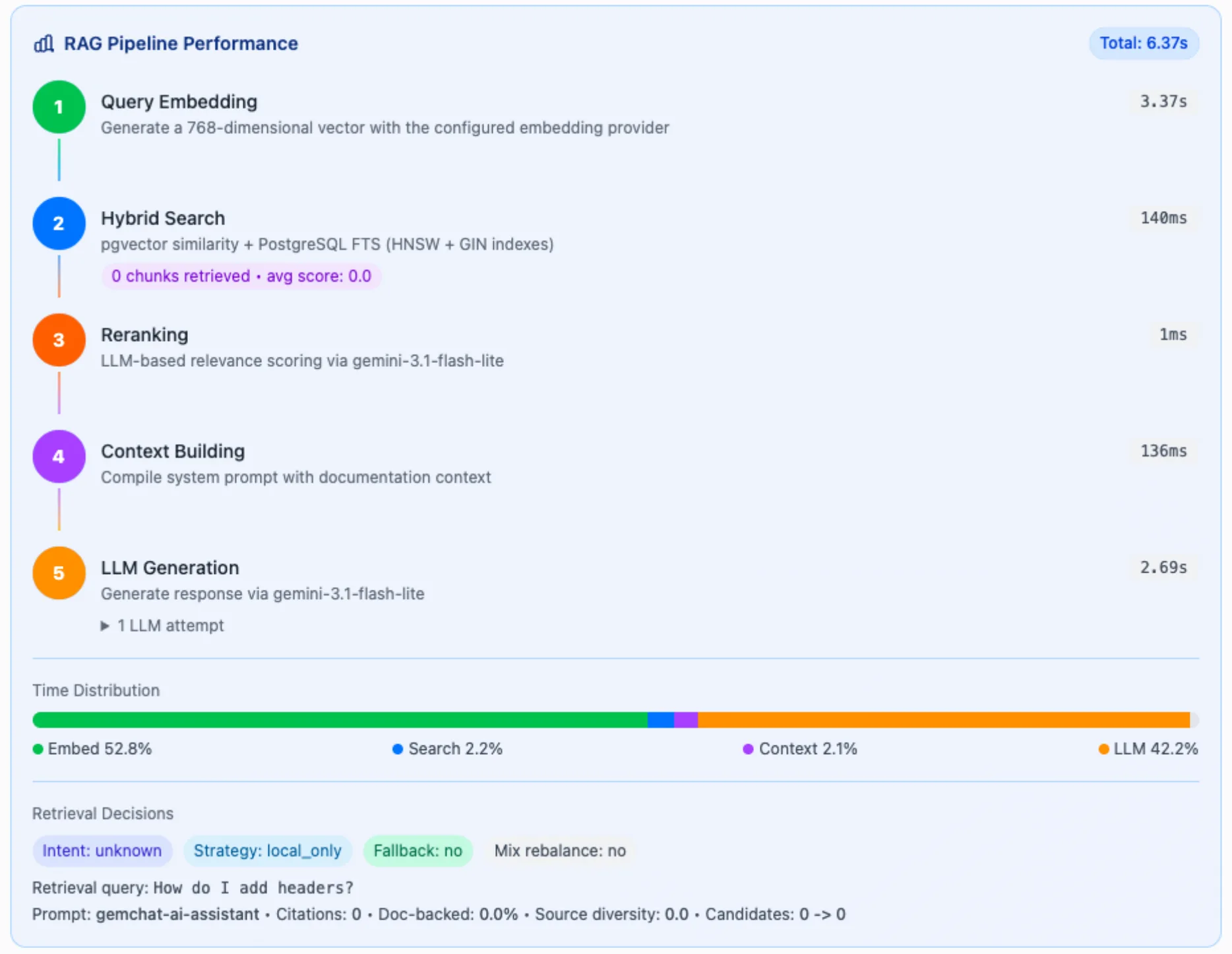
Because the model is constrained to the retrieved documentation, answers are grounded in what the gem actually says — not what the model hallucinated from its training data. And because each answer cites its sources, you can click through and verify.
Version-aware and multi-gem
Two details I care about as a Rails developer:
- Version scoping — when a gem has indexed versions, GemChat searches the docs for the version you selected. No more following a Rails 8 guide when you’re on 7.1.
- Multi-gem questions — select several gems and ask cross-cutting questions like “which of these should I use for background jobs?” or “what’s the difference in how puma and falcon handle threads?”
Resilient by default
The LLM layer uses a provider chain: Gemini as primary, DeepSeek as secondary, and OpenAI as tertiary fallback. If one provider is overloaded, the next one answers instead of you getting a blank page.
What you can ask
Some examples:
- “How do I configure Sidekiq’s Redis connection?”
- “What’s the difference between
belongs_toandhas_onein Rails?” - “How do I preload associations in a background job?”
- “What thread settings should I use for puma in production?”
Each answer includes a Sources section listing the exact documentation chunks used, so you can dig deeper or verify.
MCP support: gem docs inside your AI coding tools
The most exciting part for me: GemChat is also a Model Context Protocol (MCP) server. If you use an AI coding assistant like Claude Code, OpenCode, or Cursor, you can give it direct access to Ruby gem documentation — no browser, no copy-paste.
The server lives at POST https://gemchat.org/api/mcp and exposes six tools:
| Tool | Auth | What it does |
|---|---|---|
search_gems |
Public | Find gems by description |
get_gem_info |
Public | Gem metadata (version, URLs) |
query_docs |
Auth | Hybrid search over indexed docs |
ask_gemchat |
Auth | Full RAG Q&A with source citations |
find_similar_gems |
Auth | Alternative/replacement gem discovery |
read_changelog |
Auth | Read gem changelogs from GitHub |
Your coding agent tries ask_gemchat first for any gem question — it gets a synthesized, cited answer from the full RAG pipeline. If retrieval is weak, it falls back to the more targeted tools: query_docs to inspect raw chunks, search_gems to discover a gem, or read_changelog for version history.
Getting an API key
Two tools are public; the other four need a key:
- Sign in to gemchat.org with GitHub
- Open the sidebar menu → Settings
- Type a name for your key (e.g. “Claude Code”) and click Create Key
Connecting Claude Code
Add this to your claude.json:
{
  "mcpServers": {
    "gemchat": {
      "url": "https://gemchat.org/api/mcp",
      "headers": {
        "Authorization": "Bearer <MCP_API_KEY>"
      }
    }
  }
}
Connecting OpenCode
Add this to your opencode.json:
{
  "mcp": {
    "gemchat": {
      "type": "remote",
      "url": "https://gemchat.org/api/mcp",
      "headers": {
        "Authorization": "Bearer <MCP_API_KEY>"
      },
      "enabled": true
    }
  }
}
(Cursor uses the same format as Claude Code, in your .mcp.json.)
Once connected, you can ask your assistant things like:
- “What are the alternatives to rack-cors?” →
find_similar_gems - “Show me the Rails 8.0 changelog” →
read_changelog - “How do I configure Sidekiq’s Redis connection?” →
ask_gemchat - “Find me a gem for background job processing” →
search_gems
No more alt-tabbing to the browser to check a gem’s docs mid-conversation.
Try it
- Chat with gem docs: gemchat.org
- MCP server docs & setup: gemchat.org/mcp
It’s free to use. If you build something with the MCP server, or have a gem you’d like indexed, let me know — I’d love to hear how it works in your workflow.