I prefer master over main, and I want git init to stop assuming otherwise.
Git lets you decide.
Set it globally
Run this once:
git config --global init.defaultBranch master
Every new repository you create from now on starts on master, and Git stays quiet about it.
Verify it
For reference, every output in this post comes from:
$ git --version
git version 2.54.0
Read the value back straight from your global config:
$ git config --global init.defaultBranch
master
You can also ask Git directly what it would use (needs Git 2.35 or later):
$ git var GIT_DEFAULT_BRANCH
master
Or prove it end to end:
$ cd /tmp && mkdir demo && cd demo
$ git init
Initialized empty Git repository in /tmp/demo/.git/
$ git branch --show-current
master
Why bother setting it at all
Git’s built-in default is still master — an unconfigured git init uses it, as git var GIT_DEFAULT_BRANCH confirms. That will change: the Git project has declared that starting with Git 3.0, unconfigured git init will use main instead, which is exactly why pinning the value now is worth doing.
Setting git config --global init.defaultBranch master explicitly does not change anything about existing repositories. Every future git init command will create a repository with its initial branch named master instead of main.
Previously on Git 2.28, running git init without this setting printed a wall of text on every single new repository:
hint: Using 'master' as the name for the initial branch. This default branch name
hint: is subject to change. To configure the initial branch name to use in all
hint: of your new repositories, which will suppress this warning, call:
hint:
hint:   git config --global init.defaultBranch <name>
Modern Git dropped that hint, but setting the value is still the supported way to pin the behavior instead of inheriting whatever the toolchain happens to ship. Now that Git 3.0 will flip the default to main, my repos keep starting on master.
Alternatives
One repository only
The -b flag (short for --initial-branch) sets the initial branch for a single git init without touching any config:
git init -b master
This is the right tool when you are scripting repository creation and want the branch name stated explicitly at the call site rather than inherited from someone’s global config.
One command, no config at all
-c passes a config value to a single invocation:
git -c init.defaultBranch=master init
Handy in CI, or on a machine whose global config you do not control.
Where the config lives
--global writes to ~/.gitconfig.
Your per-user config is the right home for this setting. A repo-local init.defaultBranch (in that repo’s .git/config) would have no effect anyway - the repository already exists, so there is nothing left to initialize.
An existing repository
init.defaultBranch only applies to repositories that do not exist yet. It does not rename anything.
To rename the current branch in a repo that is already on main:
$ git branch -m master
If the repo has a remote, renaming locally is only step one. The remote still has main, and it is probably still the default. Finish the job in three steps:
- Push the renamed branch and set it as upstream:
git push -u origin master
- Delete the old branch remotely:
git push origin --delete main
Warning: protect the branch you want to keep before you delete anything. On GitHub that’s Settings → Branches → Branch protection rules ; on GitLab, Settings → Repository → Protected branches . Protection blocks both deletion and force-push — which is also why step 3 sometimes has to happen before step 2.
- If
mainwas the default branch, repoint it in Settings → Branches (on GitHub) or Settings → Repository → Branch defaults (on GitLab). Some forges refuse to delete the default branch until you do this first.
For a shared repository, coordinate the rename. Renaming a default branch that other people clone breaks their local branches until they run git branch -m and git fetch themselves.
Set it on GitHub and GitLab too
init.defaultBranch only affects repositories you create on your own machine. GitHub and GitLab each create the first branch themselves, and both let you change the initial default branch name.
GitHub
GitHub’s own default has been main since October 2020.
| Scope | Where to change it |
|---|---|
| Personal | Settings → Repositories |
| Organization | Settings → Repository → General → Change default branch name now |
| Enterprise | /settings/member_privileges, can be enforced across every org |
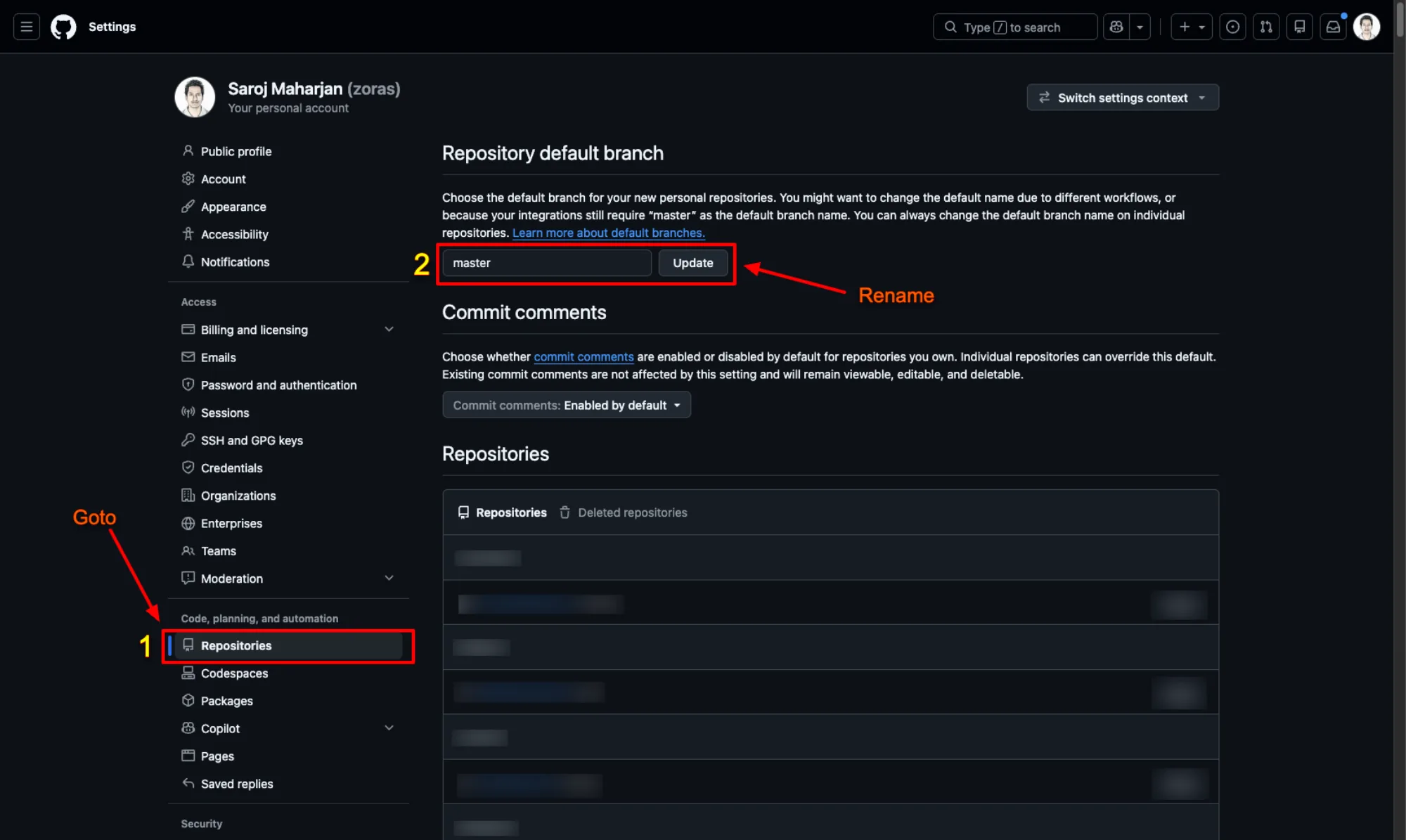
Your personal default, applied to every new repo you create
For your own account, open Settings → Repositories
, type master into the Repository default branch field, and press Update.
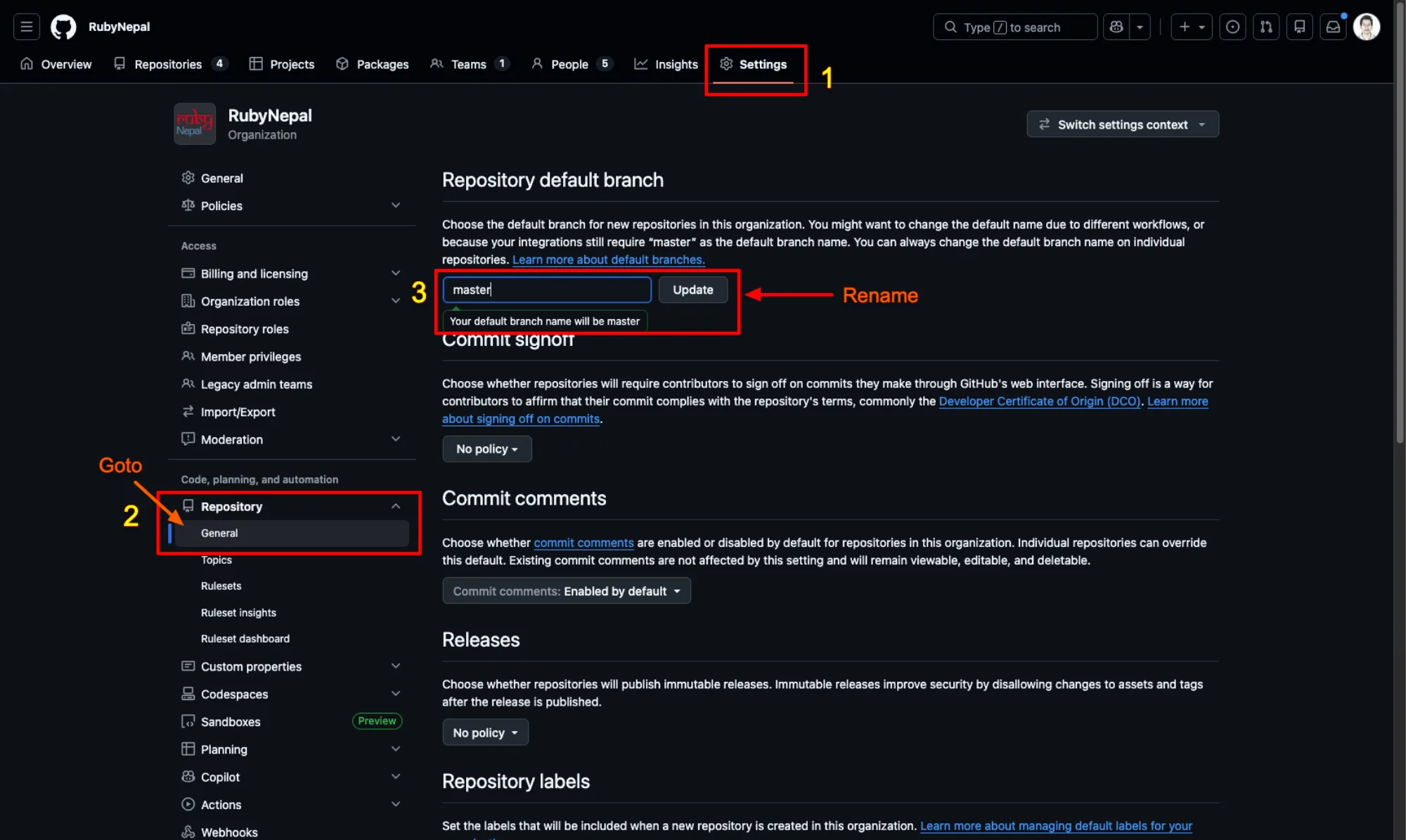
Organization owners set the default for repos their members create
Org owners go to Settings → Repository → General and set Repository default branch, or shortcut straight there:
https://github.com/organizations/<replace-with-your-org>/settings/repository-defaults
The org setting applies to repositories created through the web UI and the GitHub API.
There is no per-repository setting for the creation default. To change an existing repo, rename the branch from Settings → Branches. Keep in mind that an org-level ruleset can block renaming the default branch.
GitLab
| Scope | Where to change it |
|---|---|
| Group | Settings → Repository → Default branch → Initial default branch name (Owner role) |
| Instance | Admin Area → Settings → Repository → Default branch (self-managed and Dedicated only) |
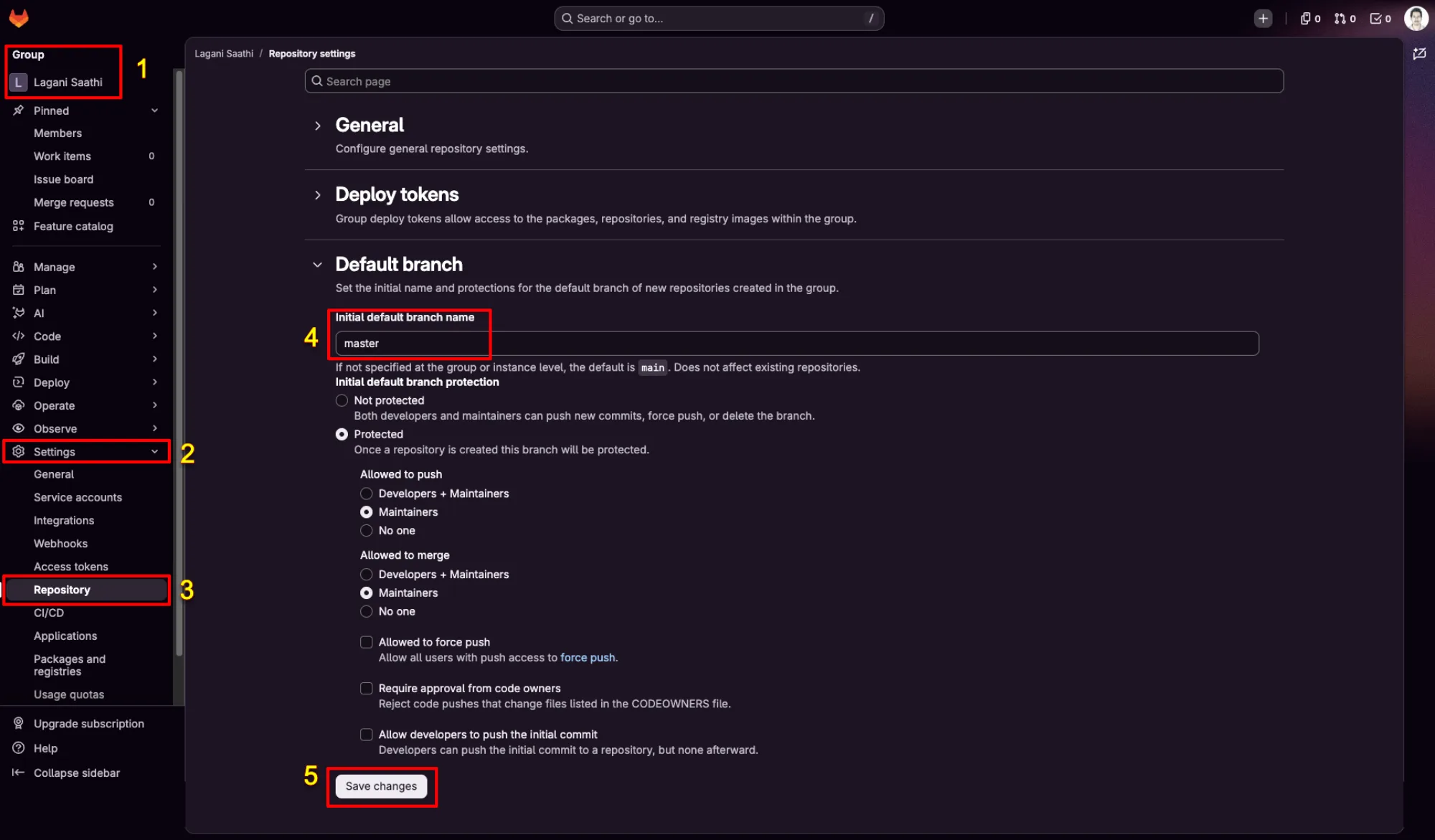
Group owners set the default for new projects in the group
Pick your group in the sidebar, then go to Settings → Repository, expand Default branch, set Initial default branch name, and press Save changes.
You can jump straight there with this URL:
https://gitlab.com/groups/<replace-with-your-group>/-/settings/repository#js-default-branch-name
Replace <replace-with-your-group> with your own group or subgroup path, then the page will scroll to the Initial default branch name field for you.
On GitLab.com the instance-level knob does not exist, so group settings are your only lever. Subgroups override their parent group.
GitLab resolves the name in this order:
- A project-specific custom default branch name
- A custom default branch name from the project’s direct subgroup
- A custom default branch name from the top-level group
- A custom default branch name set for the instance
- Otherwise
main
The projects API can also set the branch at creation time, as long as you ask for a README:
curl --request POST \
  --header "PRIVATE-TOKEN: $GITLAB_TOKEN" \
  --data "name=my-project&initialize_with_readme=true&default_branch=master" \
  "https://gitlab.com/api/v4/projects"
One thing clone does differently
git init reads your config, but git clone does not. A clone checks out whatever branch the remote’s HEAD points at, so init.defaultBranch has no say. A repo you created on GitHub before changing the setting still lands you on main locally until you rename it:
git branch -m master
git push -u origin master
Takeaway
Locally:
git config --global init.defaultBranch master
On GitHub and GitLab, set the default branch name in your user or group settings so new remote repos match.
Then, for the repos that already exist:
git branch -m master
And for a one-off where you do not want any config involved at all:
git init -b master